
How To Buy on M8X
Things to Know Before Purchase:
• Unlocked Transfer Market on Web App: You must have access to the transfer requests on the FUT Web/Companion App.
• 10000 Coins in FUT account: You need to have at least 10000 coins in your game to start trading. Having more coins will lead to faster and safer order fulfillment.
• Stay Logged Out: Do not log into your FC 26 game account, Web App and Mobile App to prevent any interruptions during the transaction.
Step-by-Step Process
1. Please log in to your member account before placing an order, click "FC 26 Coins".
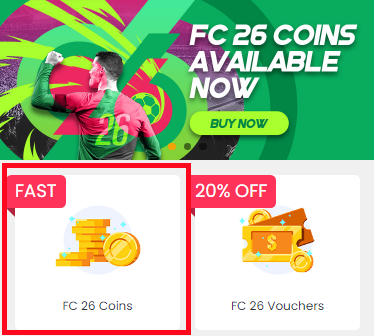
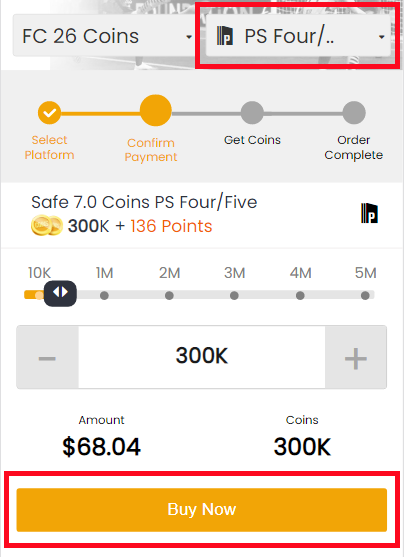
2. Choose your console, enter or select the coins amount you want to buy, then click "BUY NOW".
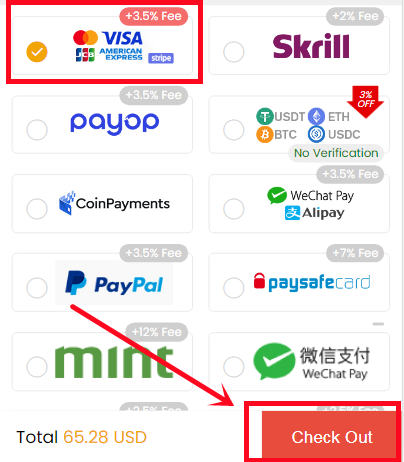
3. Choose the payment method and proceed to CHECKOUT.
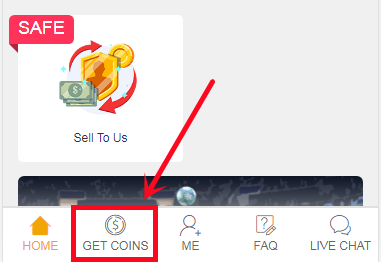
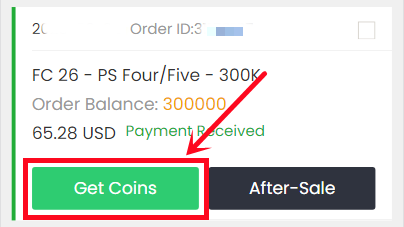
4. Turn to "GET COINS" at bottom of the page, find your order, and click "Get Coins".
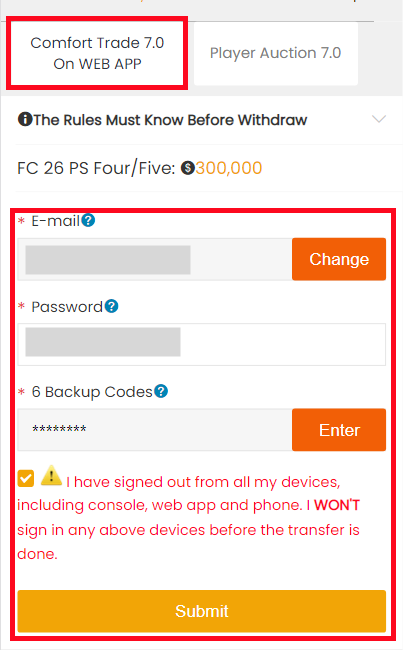
5. Choose "Comfort Trade 7.0 On WEB APP" transfer method. Type your correct Origin account information below, then click "Submit". It will take minutes to verify your account, please wait patiently.
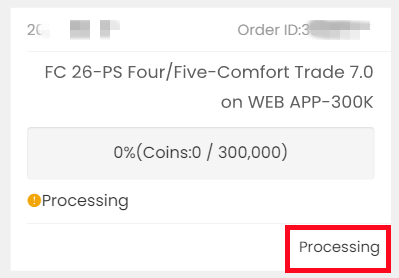
6. You can check the coins transfer processing on "ME - My Withdraw Orders - Coins Delivery History".
Things to Know Before Purchase:
• Set Correct Price & Duration: Please follow the system's instructions exactly when setting your player's price and duration.
• EA Tax Covered (5%): We'll cover the 5% EA tax, but the coins you spend to buy the player from market aren't included.
• Repeat If Needed: Each player has a limited value, so you can repeat the process multiple times to reach your desired amount.
Step-by-Step Process
1. Please log in to your member account before placing an order, click "FC 26 Coins".
2. Choose your console, enter or select the coins amount you want to buy, then click "BUY NOW".
3. Choose the payment method and proceed to CHECKOUT.
4. Turn to "GET COINS" at bottom of the page, find your order, and click "Get Coins".
5. Choose Player Auction 7.0 method.
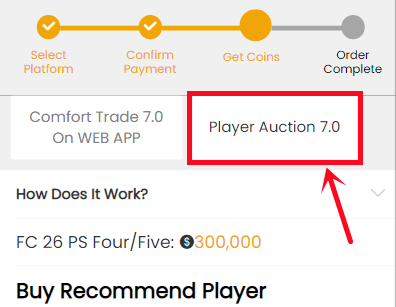
6. Scroll down, type your EA account's current coins amount, click "Search" and get the search condition.
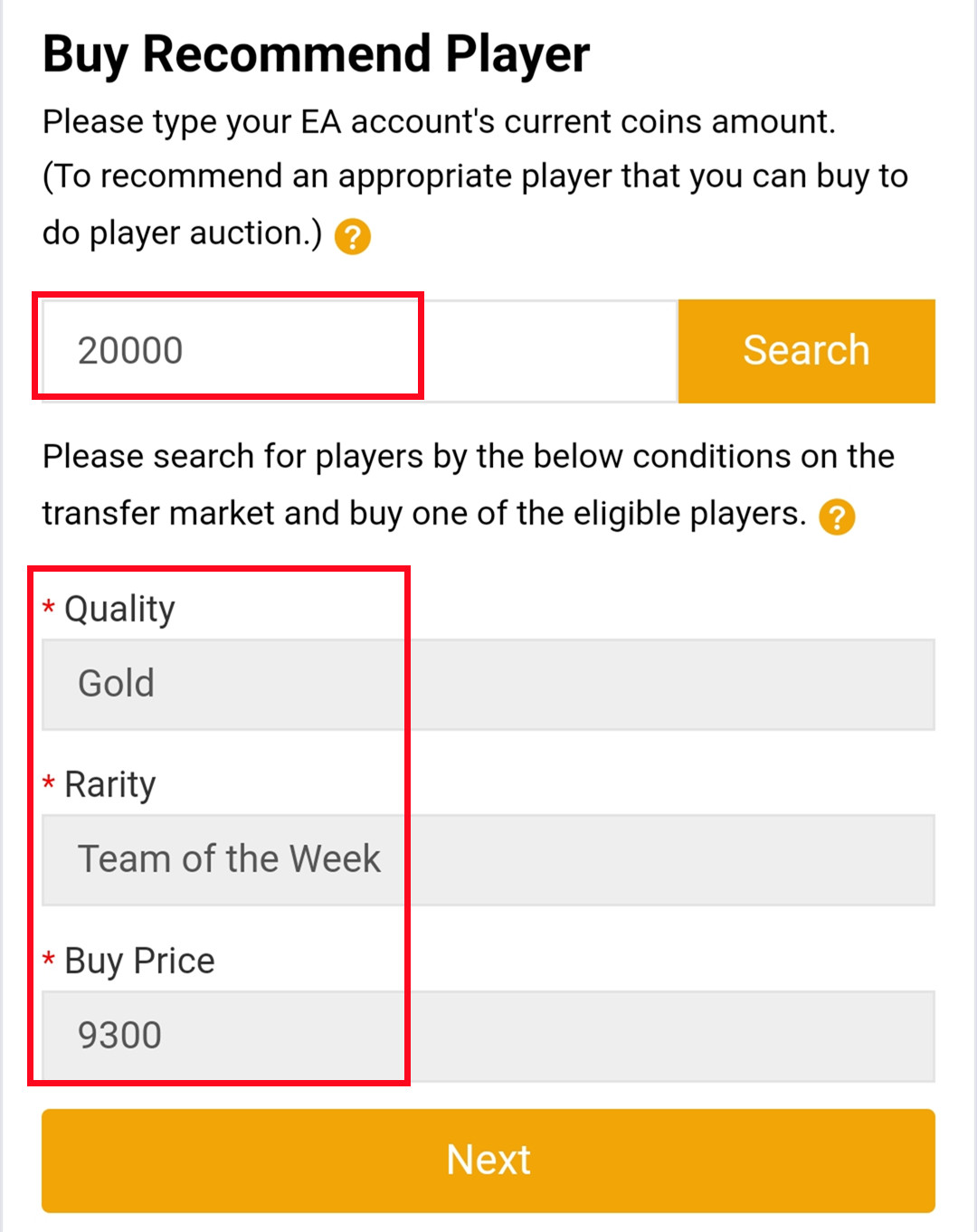
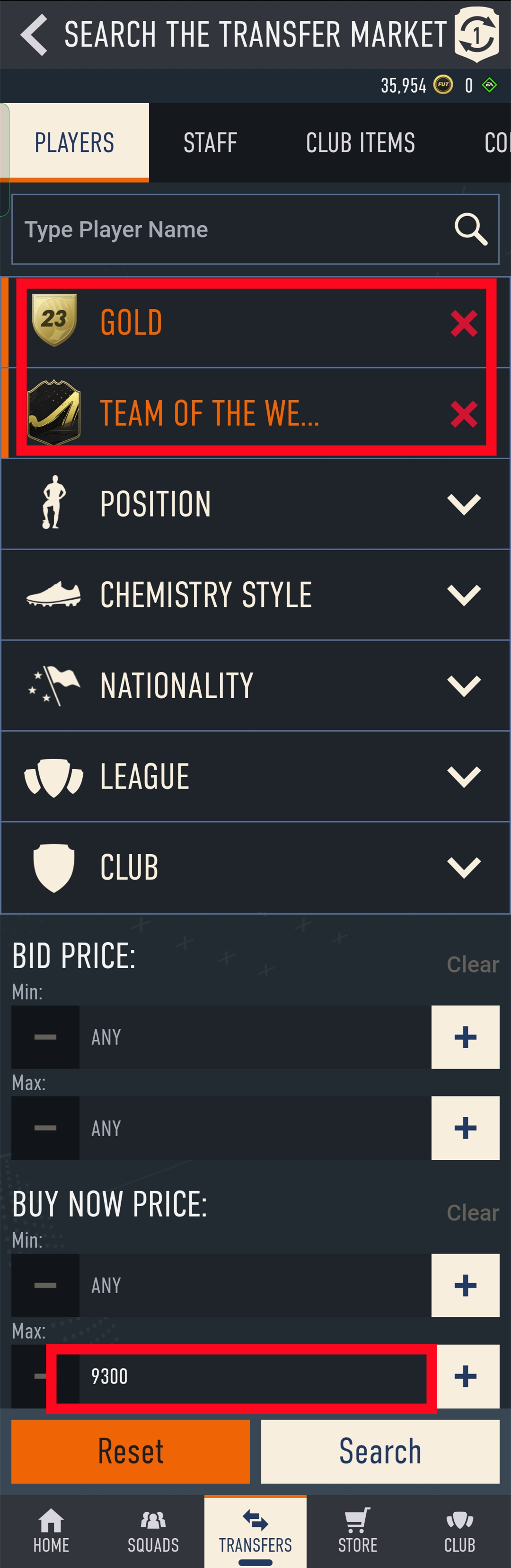
7. Come to the transfer market on EA web app/console, according to the condition, search for players and buy one of the eligible players.
8. Back to Player Auction 7.0 page, click "Next" to next step. You will get the set price for the player.
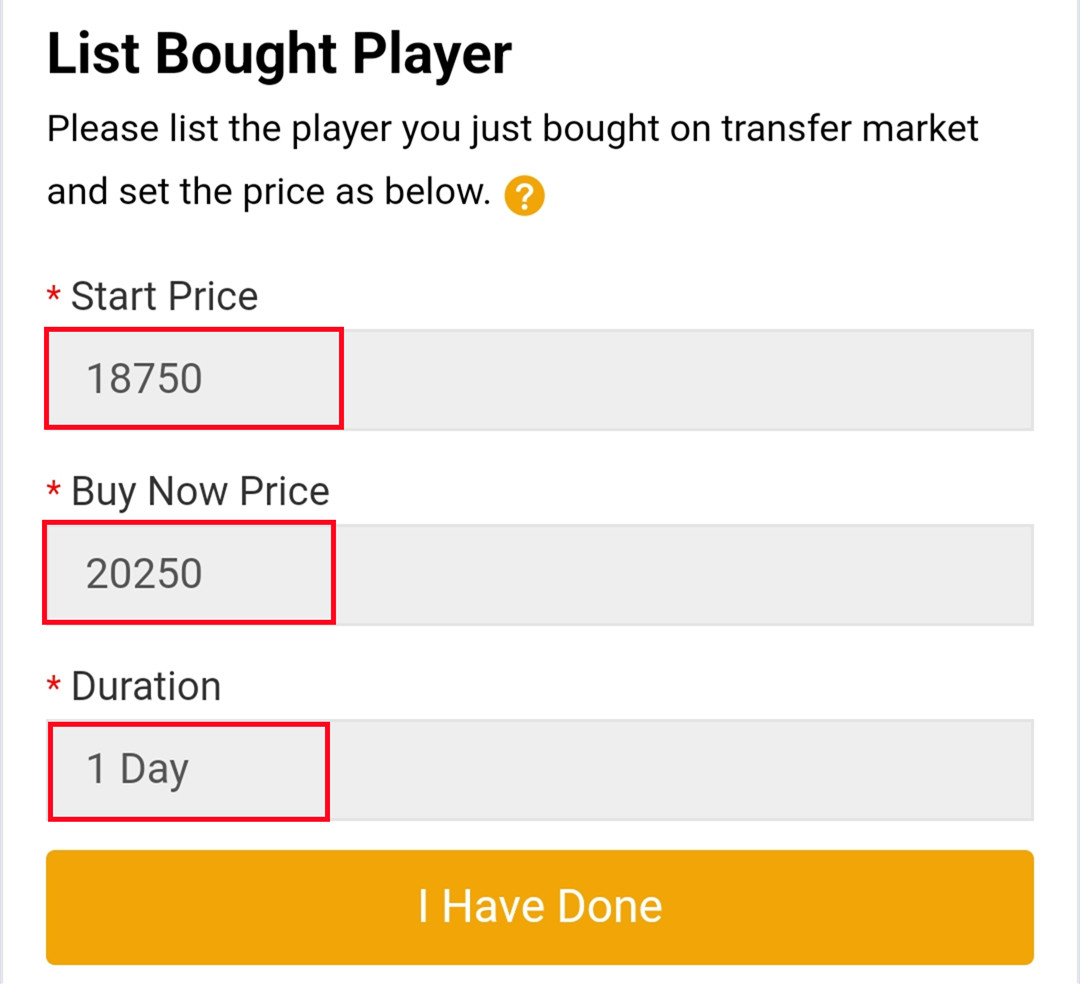
9. Come to EA web app, list your bought player on the transfer market and set the price exactly as per the info provided by us.
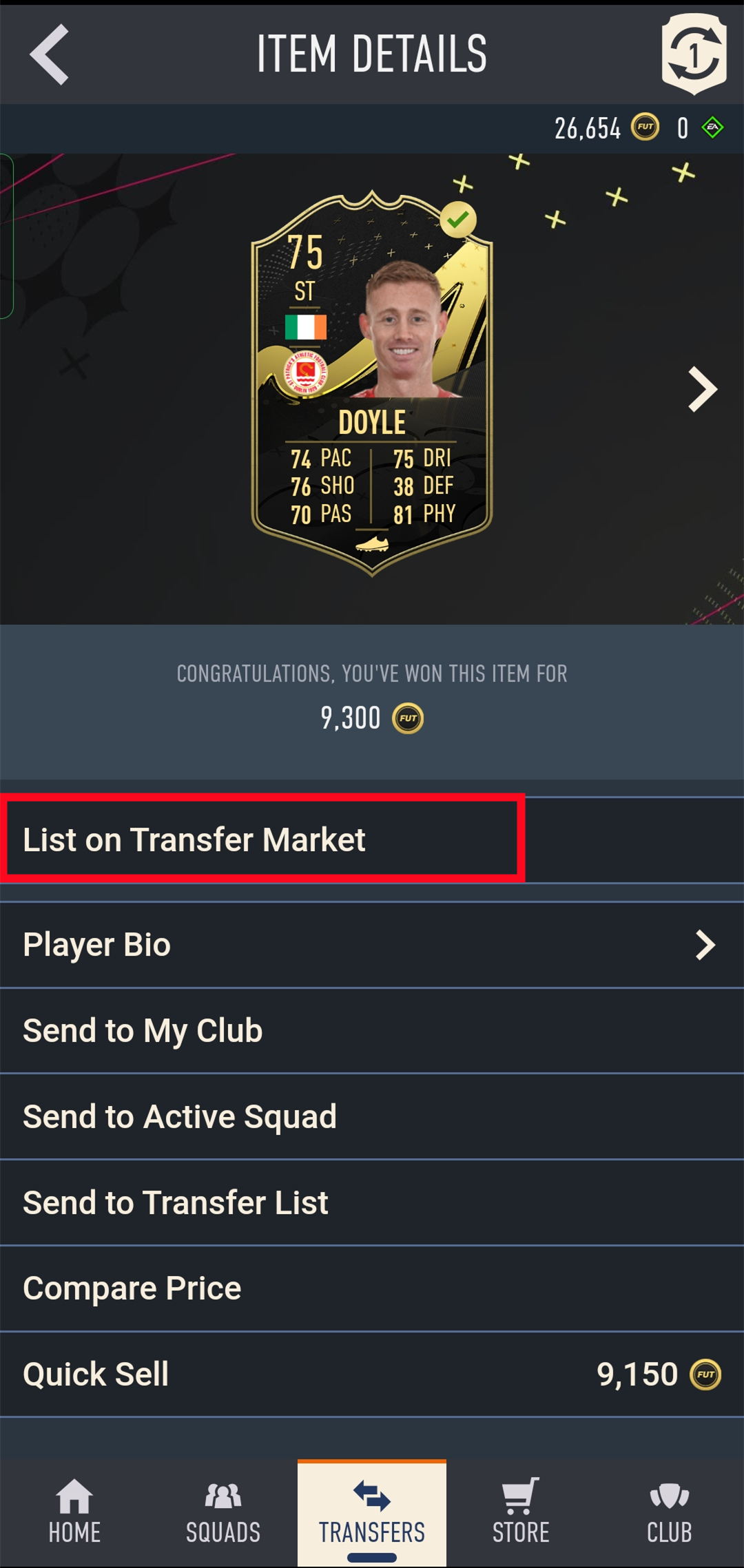
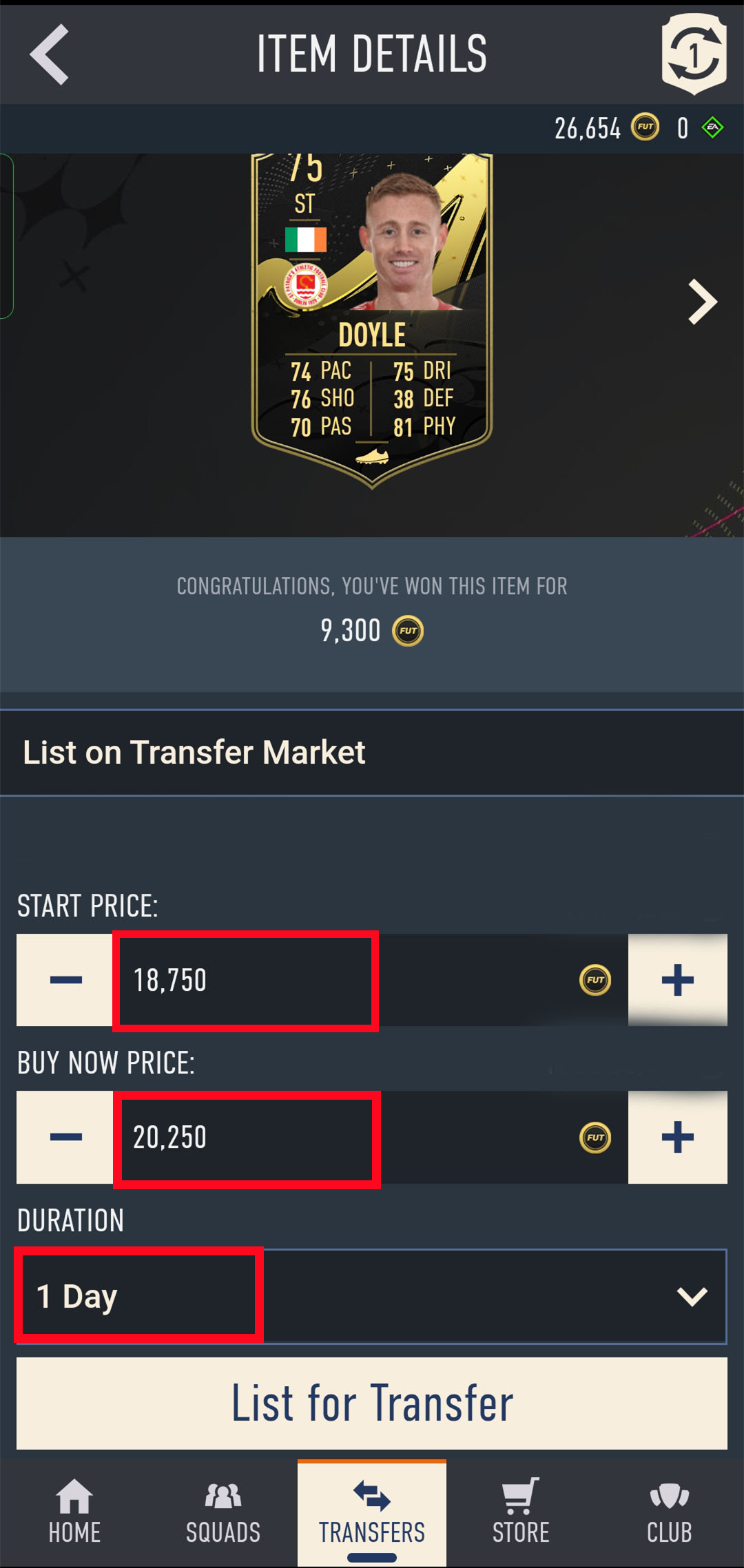
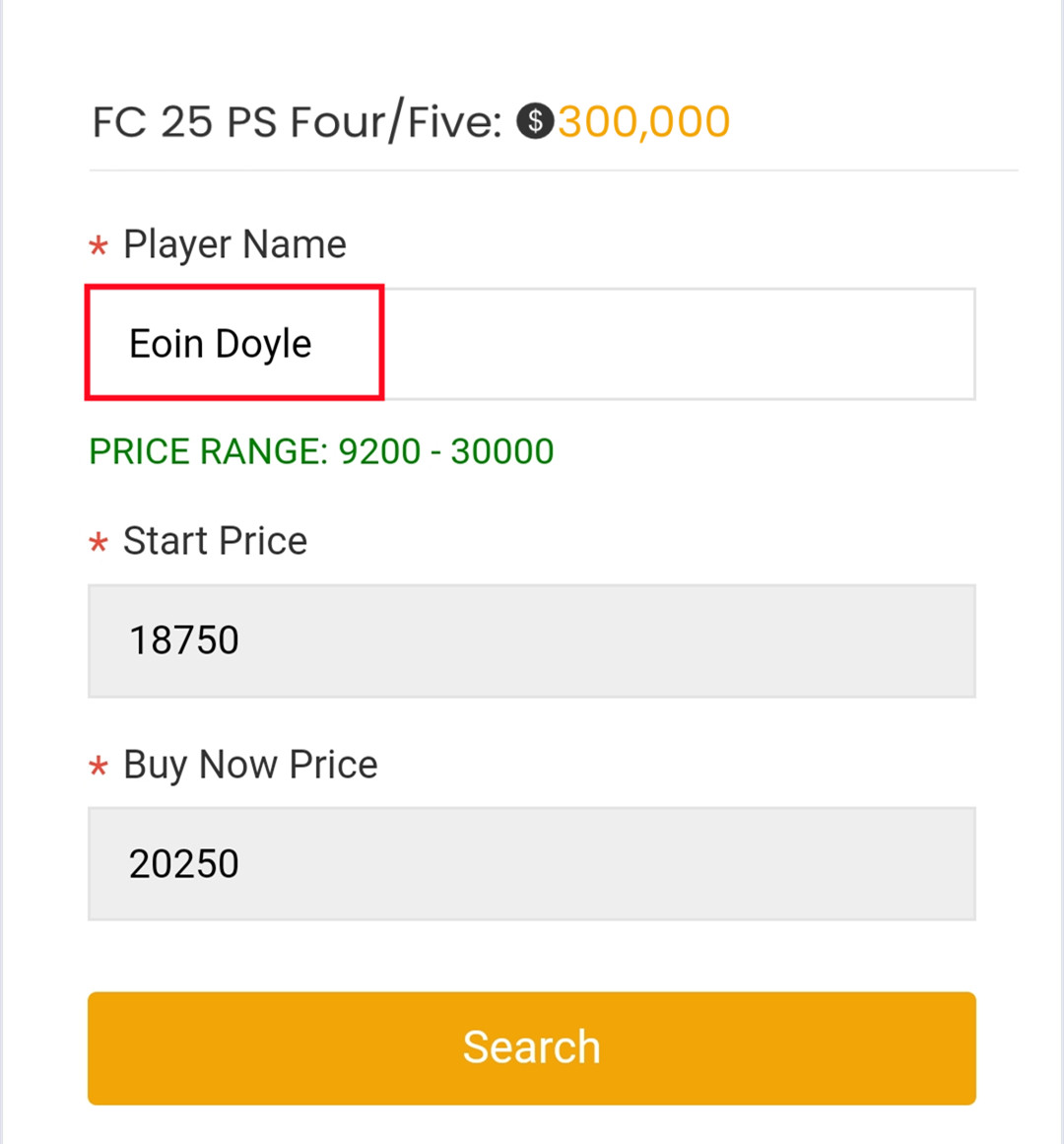
10. Back to Player Auction 7.0 page, click "I Have Done" to next step. Type your listed player's name and select the right one then click "Search".
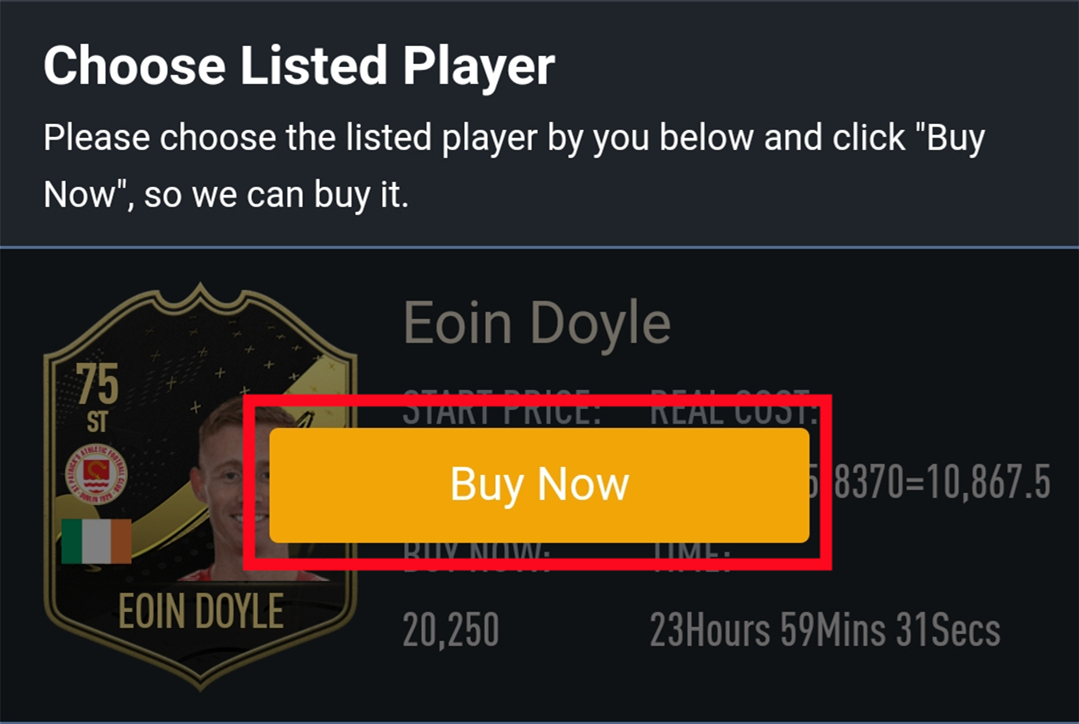
11. Our system will locate player cards automatically. Please confirm and choose the player card listed by you, then click "Buy Now".
12. Please wait for a while till we buy your player card, then log in to collect your coins. You can repeat this process to withdraw more coins via Player Auction 7.0.
Things to Know Before Purchase:
• Unlocked Transfer Market on Web App: You must have access to the transfer requests on the FUT Web/Companion App.
• 10000 Coins in FUT account: You need to have at least 10000 coins in your game to start trading. Having more coins will lead to faster and safer order fulfillment.
• Stay Logged Out: Do not log into your FC 26 game account, Web App and Mobile App to prevent any interruptions during the transaction.
Step-by-Step Process
1. Please log in to your member account, and Click "FC 26 Players".
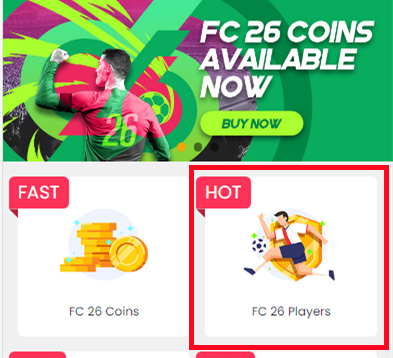
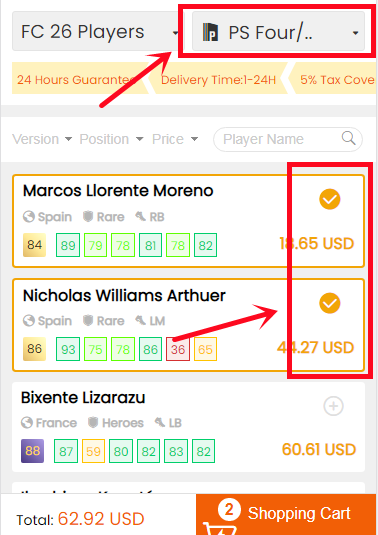
2. Choose your console and the players you want to buy.
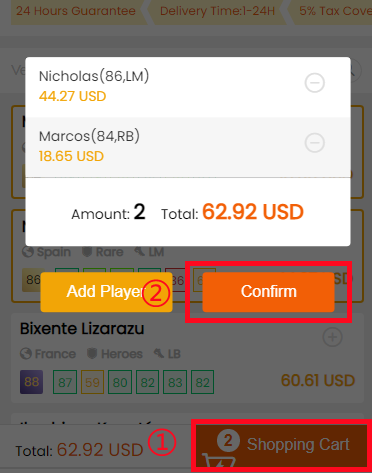
3. Click the Shopping Cart at bottom of the page. Double-check all the players you choose, then click "Confirm".
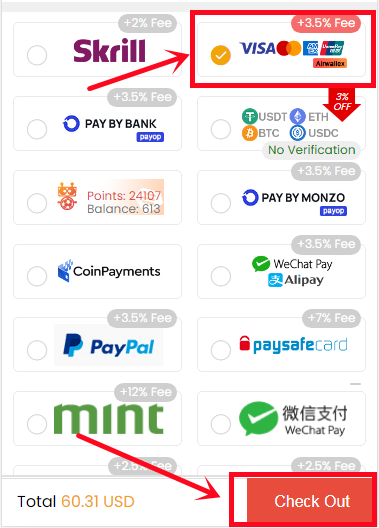
4. Choose the payment method and proceed to Check Out.
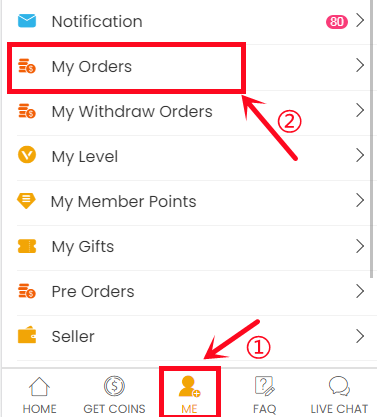
5. After paying successfully, please go to "ME - My Orders - Order History", find the order you just paid for then click "Get Players".
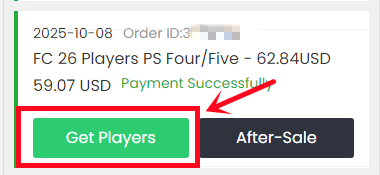
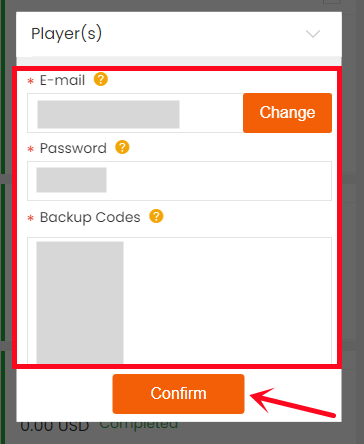
6. Type your correct game account information, and click "Confirm". It will take minutes to verify your account, please wait patiently.
Notice: Transfer market unlocking on web app is necessary to buy players.
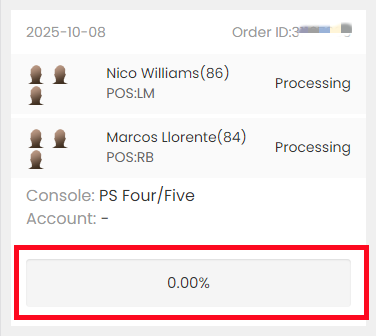
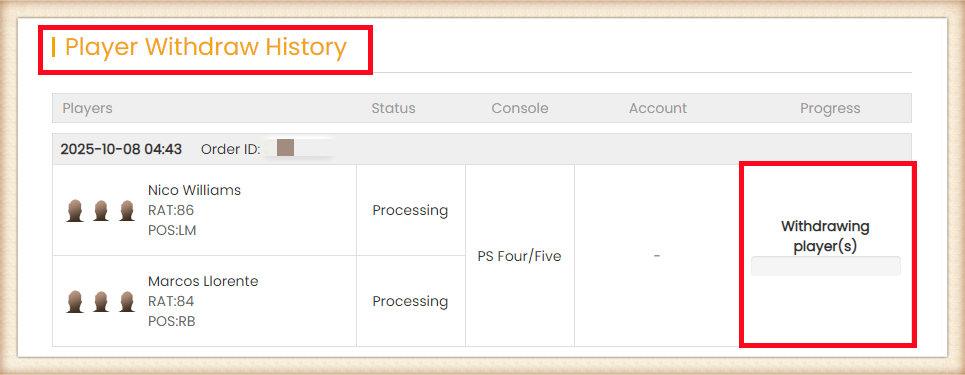
7. Then, you can go to "ME- My Withdraw Orders - Player Withdraw History" to check the order status.
Delivery Infomation
Time: 0-12H/100K
Security: ★★★★★
Inform: Email.
Things to Know Before Purchase
• Unlocked Transfer Market on Web App: You must have access to the transfer requests on the FUT Web/Companion App.
• 10000 Coins in FUT account: You need to have at least 10000 coins in your game to start trading. Having more coins will lead to faster and safer order fulfillment.
• Stay Logged Out: Do not log into your FC 26 game account, Web App and Mobile App to prevent any interruptions during the transaction.
Step-by-Step Process
1. Please log in to your member account before placing an order, choose "FC 26" and click "FC 26 Coins".
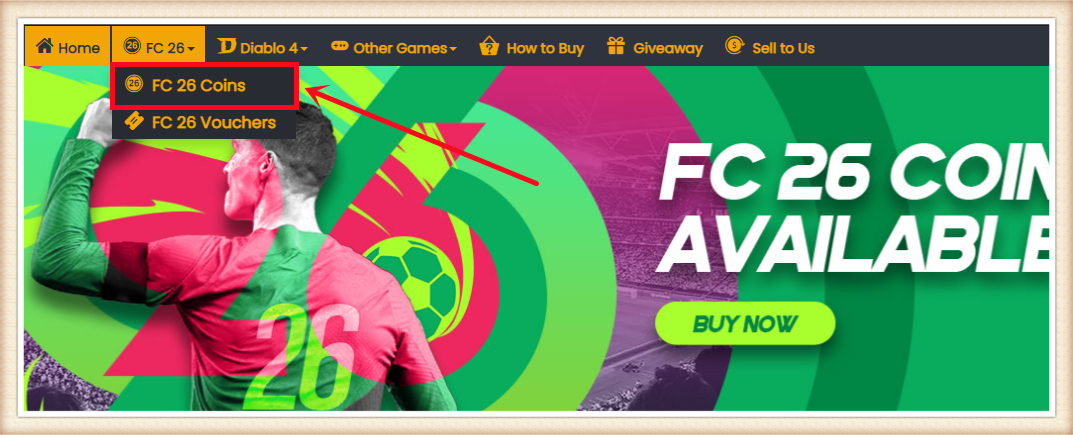
2. Choose your console, enter or select the coins amount you want to buy, then click "BUY NOW".
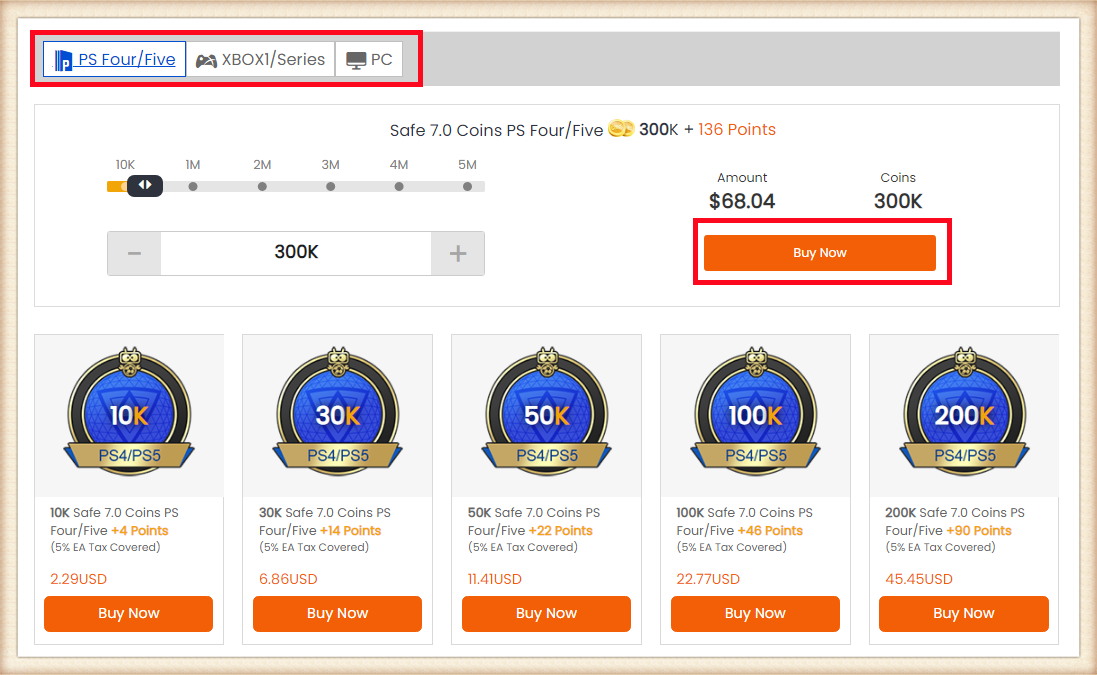
3. Choose the payment method and proceed to CHECK OUT.
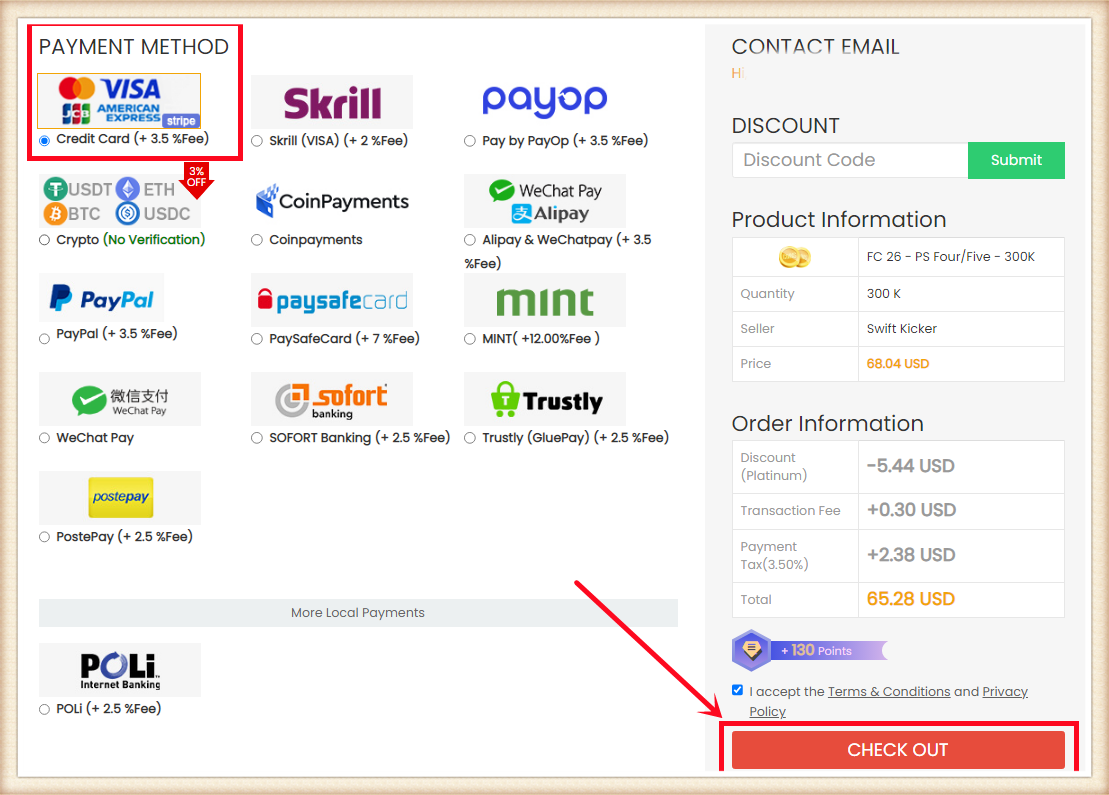
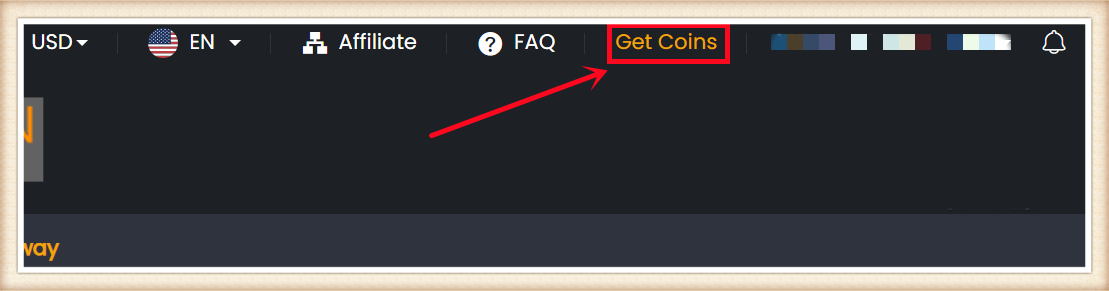
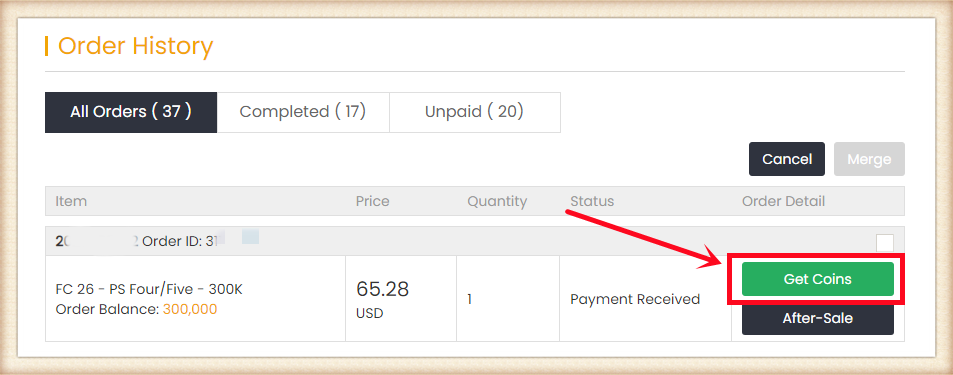
4. Click "Get Coins" at the top right, find your order, and click "Get Coins".
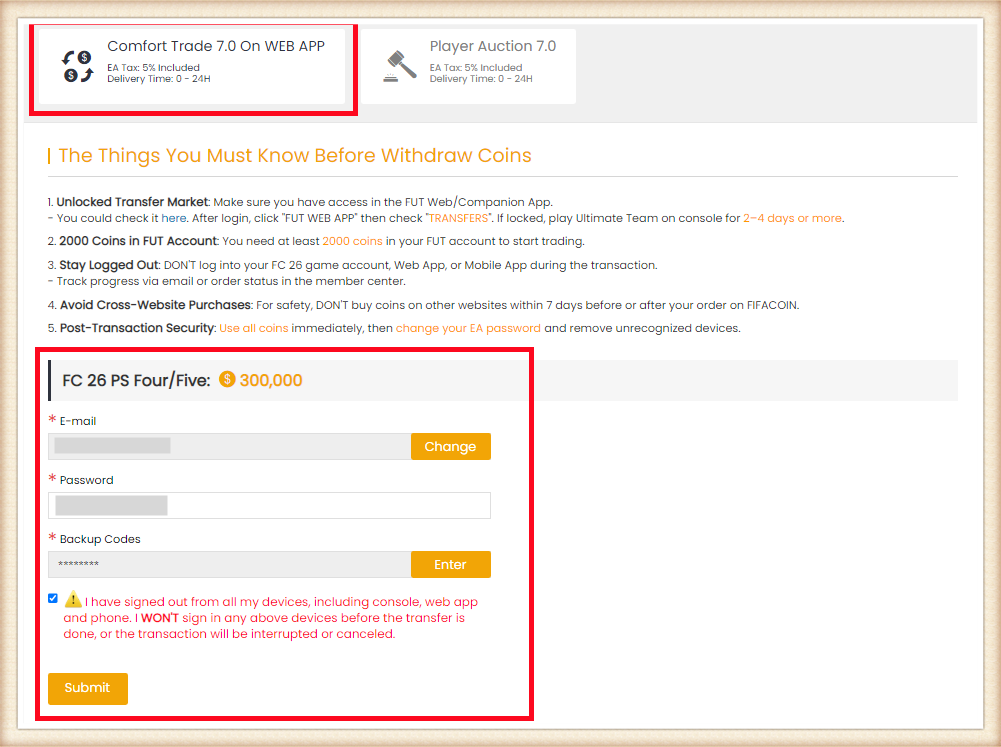
5. Choose "Comfort Trade 7.0 On WEB APP" transfer method. Type your correct EA account information below, then click "Submit". It will take minutes to verify your account, please wait patiently.
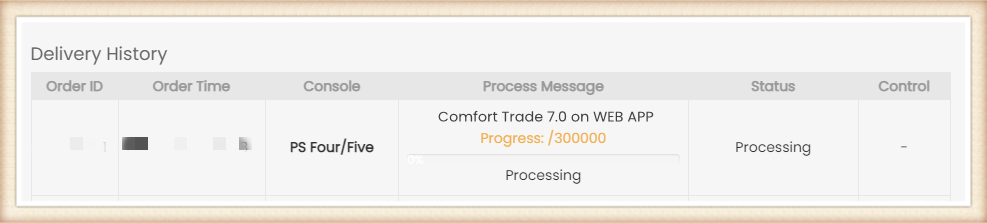
6. You can check your "Delivery History" to know the coins transfer processing.
Besides, about the explanation of the different order statuses, you can check it on FAQ - About "Order Status".
交付时间:0-24小时
安全性:★★★★★
通知方式:邮箱
注意事项:
请按照我们提供的信息 准确设置球员的价格和时长。
1. 下单前请登录会员账户,选择 "FC 26" 并点击 "FC 26 金币"。
2. 选择你的主机,输入或选择购买的金币数量,然后点击 "立即购买"。
3. 选择支付方式并进行结算。
4. 点击右上角的 "领取金币",找到订单并点击 "领取金币"。
5. 选择 Player Auction 7.0。
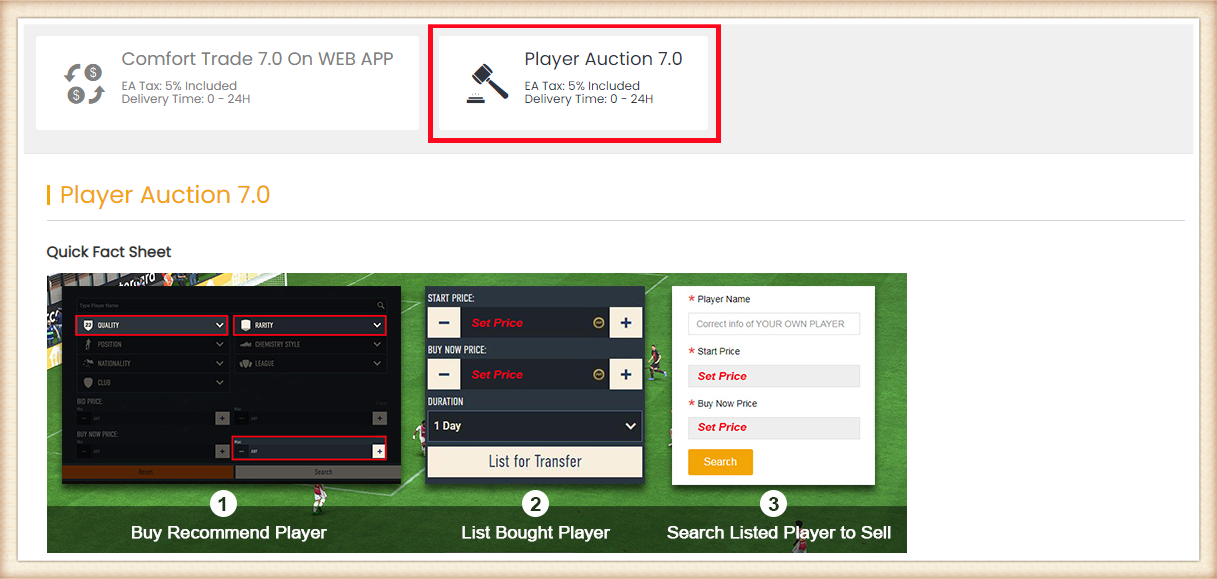
6. 向下滚动,输入 EA 账号当前金币数量,点击 "搜索",系统将根据你拥有的游戏内金币推荐可购买的球员。金币越多,可购买的卡越大,转账越快。
提示:
1. 如果你有系统推荐的球员卡,也可以使用自己的球员进行上架。
2. 购买球员所花费用不由我们承担,我们仅覆盖 5% EA 税费。
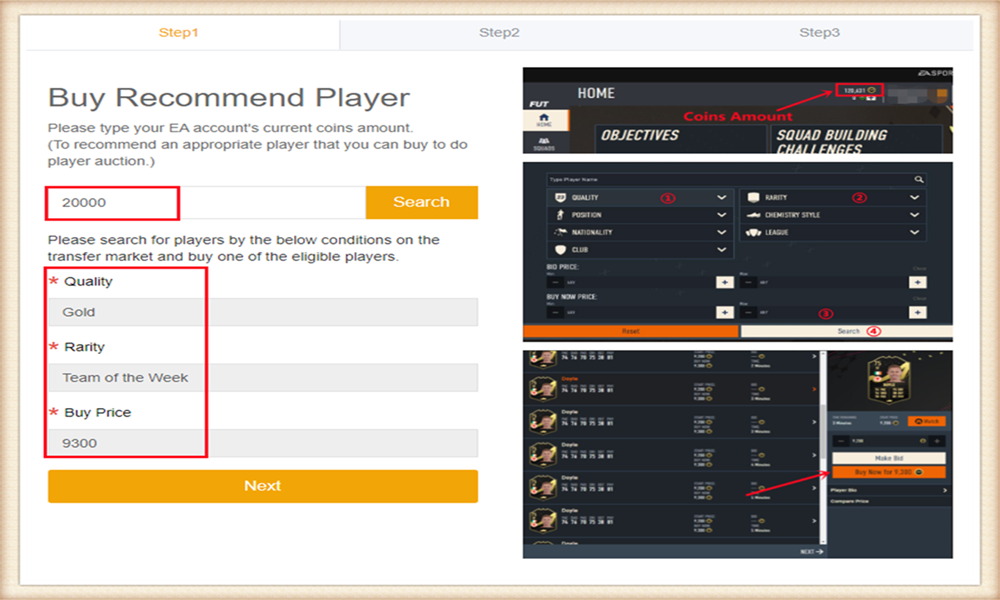
7. 前往 EA webapp/主机的转会市场,按照条件搜索并购买符合条件的球员。
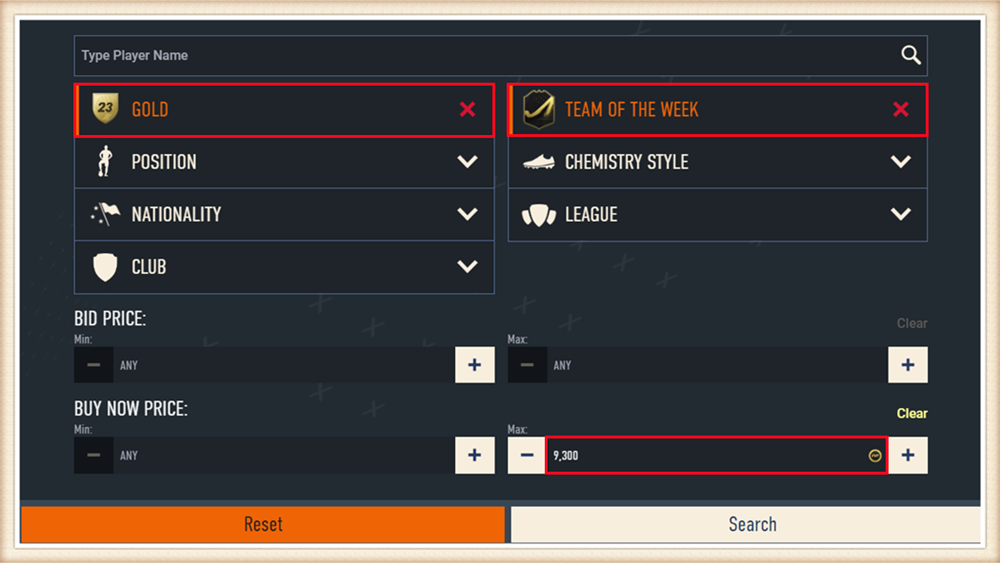
8. 回到 Player Auction 7.0 页面 - 步骤1,点击 "Next" 进入步骤2。系统会显示该球员的设定价格。
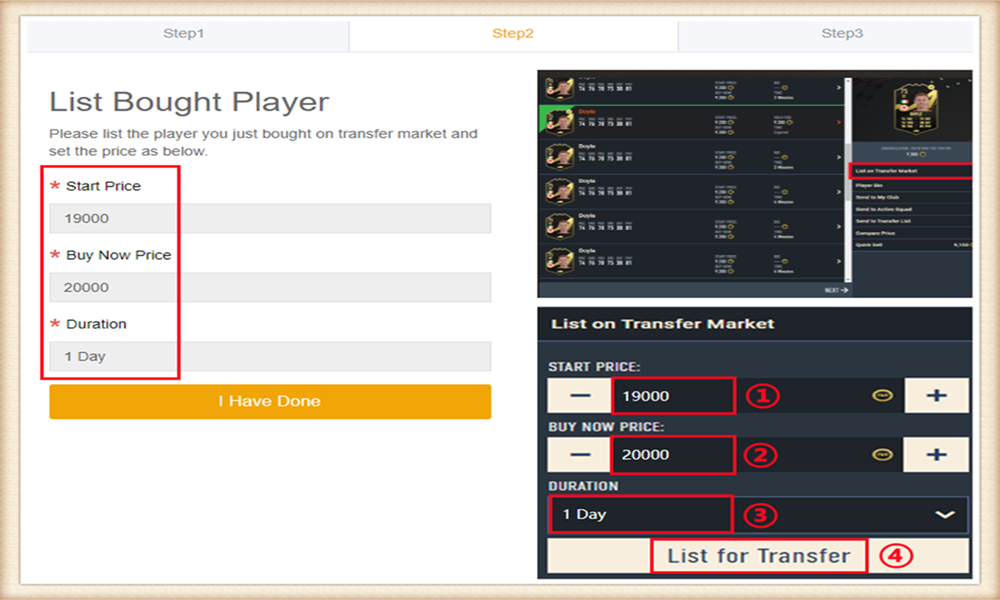
9. 前往 EA webapp,将购买的球员上架转会市场,并根据我们提供的信息准确设置价格。
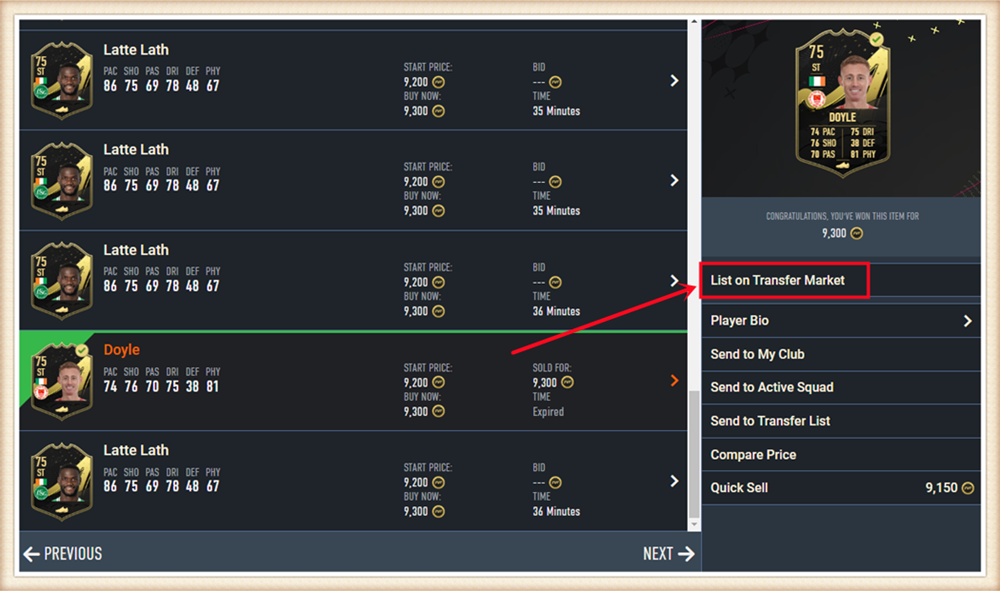
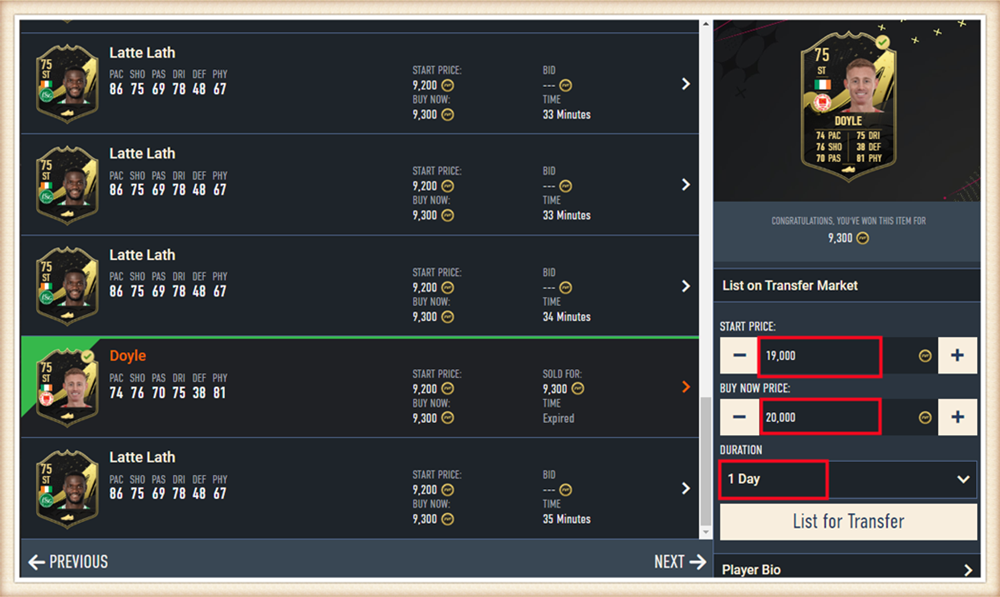
10. 回到 Player Auction 7.0 页面 - 步骤2,点击 "I Have Done" 进入步骤3。输入已上架球员名称并选择正确的球员,然后点击 "Search"。
系统会自动定位球员卡,请确认并选择你上架的卡,然后点击 "Buy Now"。
*实际可取金币*:
表示本次转会流程中你可提取的金币数量。我们仅覆盖 5% EA 税费。请注意购买球员的费用不包含在内。
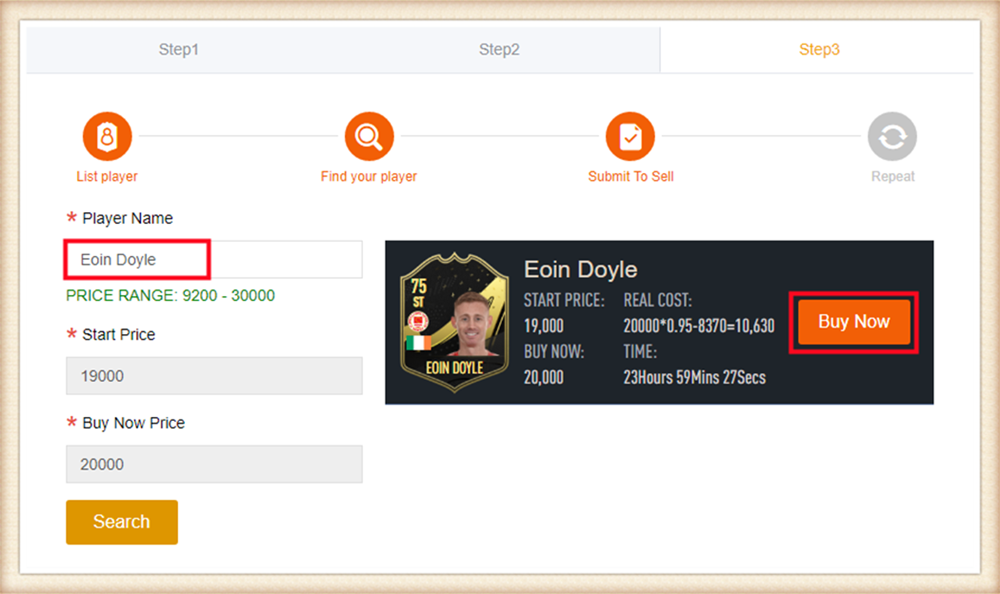
11. 请耐心等待我们购买你的球员卡,然后登录领取金币。
你可重复此流程,通过 Player Auction 7.0 提取更多金币。
Delivery Infomation
Time: 0-24H
Security: ★★★★★
Inform: Email.
Things to Know Before Purchase:
• Unlocked Transfer Market on Web App: You must have access to the transfer requests on the FUT Web/Companion App.
• 10000 Coins in FUT account: You need to have at least 10000 coins in your game to start trading. Having more coins will lead to faster and safer order fulfillment.
• Stay Logged Out: Do not log into your FC 26 game account, Web App and Mobile App to prevent any interruptions during the transaction.
Step-by-Step Process
1. Please log in to your member account, select "FC 26" and click "FC 26 Players" (If you don't have an account, please sign up first).
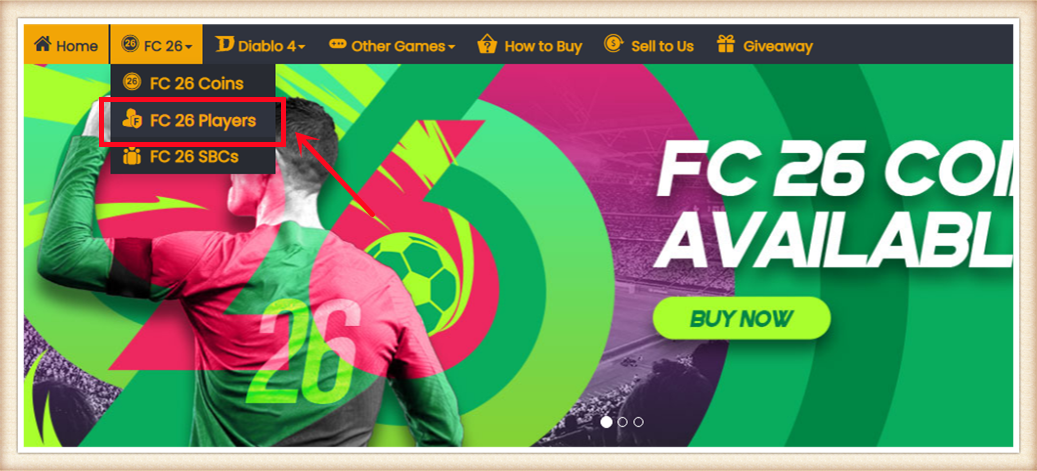
2. Choose your console and the players you want to buy.
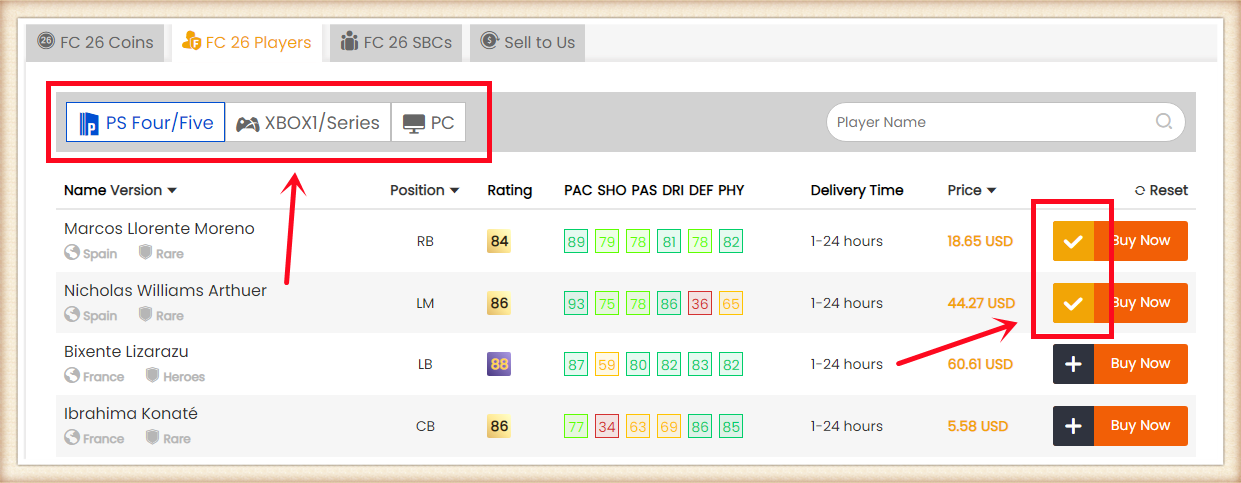
3. Click the Shopping Cart right side of the page. Double-check all the players you want to buy, then click "Confirm".
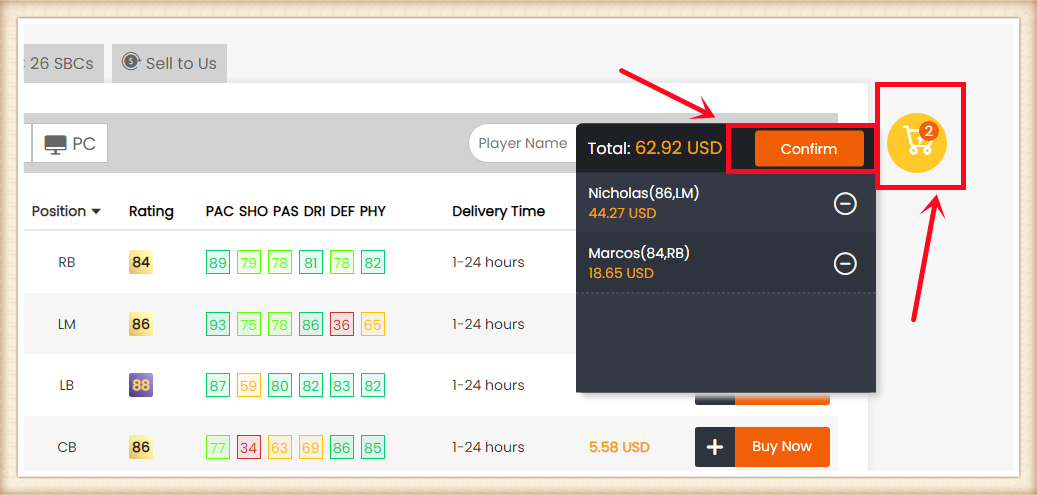
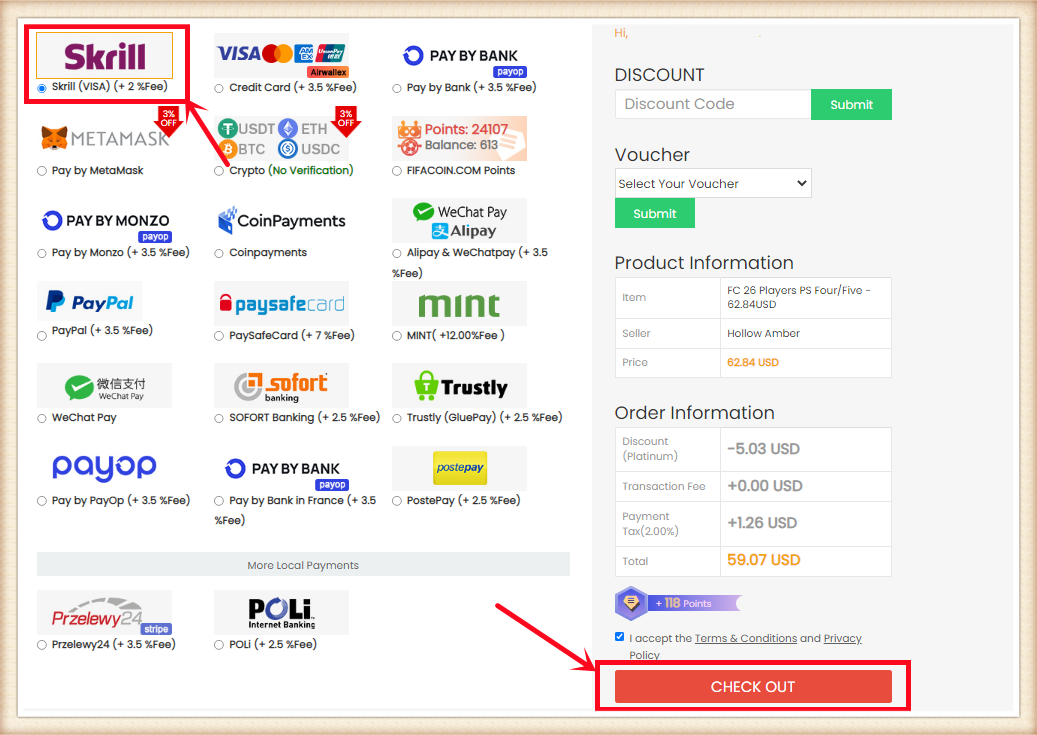
4. Choose the payment method, and CHECK OUT.
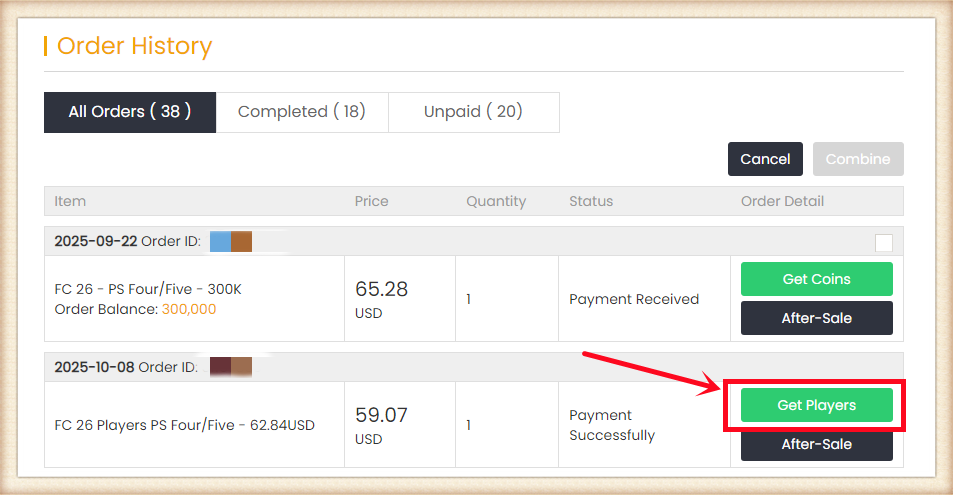
5. After paying successfully, please go to Member Center - Order History - Click "Get Players".
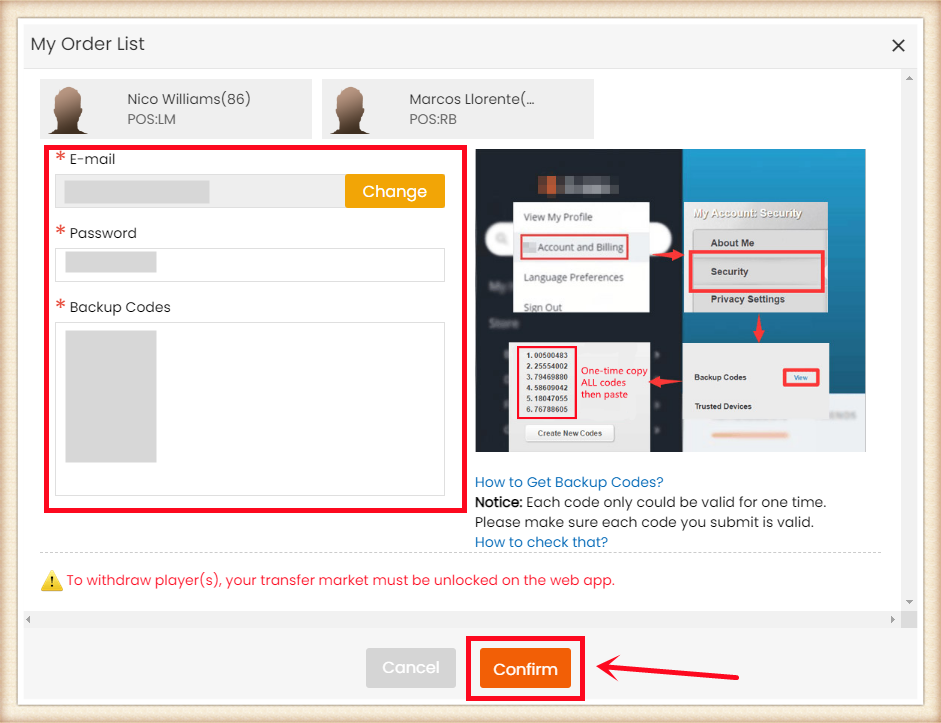
6. Type your correct game account information, and click "Confirm". It will take minutes to verify your account, please wait patiently.
Notice: Transfer market unlocking on web app is necessary to buy players.
7. After a player was bought, you can go to Member Center - Orders - Player Withdraw History to check.
1. Select your platform and order amount, then provide us with your EPIC account Email, and password on the pop-up. Then complete the payment.
Attention: You can get your EPIC account email on official website. Players on PS4 can purchase V-Bucks on PC if the account is associated with PC platform.
2. After payment, Please contact us via Live Chat, we will need verification code for login.
Note:
1. Xbox users please associate your account with Epic. You can do this here.
2. Wait for top-up and do not log in to your account until your order status is marked as "Delivery Completed" to guarantee smooth delivery service. (You can check the order status in your M8X account.) Unauthorized login will lead to Top Up failure. We will not be able to help you in this case. Thanks for understanding.
3. Players with connected Facebook or Google accounts must disconnect before buying top-up service.
4. We will deliver V-Bucks to your account ASAP(10 mins - 1 hour). Enjoy the game!
1. Please login to your member account before placing an order (please register if you don't have one). Click "DIABLO 4 Powerleveling".
2. Enter your Start Level and Desired Level, or choose the leveling package you want by category, then click "Buy Now".
3. Enter your Account Email, Password, Character Name, and your game platform then click "Buy Now".
4. Choose your preferred payment method and proceed to check out.
5. After paying successfully, please contact us via Live Chat, we will need verification code for login. You can check the order status under "Order History".
6. After all is done, we will change the order status to "D4 Powerleveling Completed" and email you. You are welcome to leave your feedback after the order is completed.
1. Please login to your member account before placing an order (please register if you don't have one). Click "DIABLO 4 Gold".
2. Choose your server season12 SC or Eternal SC and the number of Diablo 4 Gold you need, and click "Buy Now".
3. Choose your preferred payment method and proceed to check out. After paying successfully, Gold will be added to your M8X member balance.
4. Choose "Withdraw" and click Diablo 4 Gold balance.
5. Choose "DIABLO Withdraw", and click the "Go" button.
6. Fill in the information in the form as required and click "Submit".
7. After submission, you will receive in-game contact information from the trader within the agreed-upon online time period and then complete the delivery. You can check the withdrawal order status under "Delivery History".
8. After you receive the Diablo 4 Gold, we will change the order status to "Delivery Completed", you are welcome to leave your feedback after the order is completed.
1. Please login to your member account before placing an order (please register if you don't have one). Click "DIABLO 4 Items".
2. Choose an item you want to buy and click "Buy Now".
3. Enter your Character Name, BattleTag, Online Time, and the quantity of the item then click "Buy Now".
4. Choose your preferred payment method and proceed to check out.
5. After paying successfully, you will receive in-game contact information from the trader within the agreed-upon online time period and then complete the delivery. You can check the order status under "Order History". Feel free to reach out to us through Live Chat for any assistance during the process.
6. After you receive the Diablo 4 Items, we will change the order status to "Delivery Completed", you are welcome to leave your feedback after the order is completed.
1. Please login to your member account before placing an order (please register if you don't have one). Click "WOW Classic SOD Boosting".
2. Select the boosting requirements and details you need, then click "Buy Now".
3. Enter your Account Email, Password then click "Buy Now".
4. Choose your preferred payment method and proceed to check out. 5. After paying successfully, please contact us via Live Chat, we will need verification code for login. You can check the order status under "Order History".
6. After all is done, we will change the order status to "Wow SOD Boosting Completed" and email you. You are welcome to leave your feedback after the order is completed
1. Please login to your member account before placing an order (please register if you don't have one). Click "Last Epoch Boosting".
2. Select the boosting requirements and details you need, then click "Buy Now".
3. Enter your Steam Account, Steam Password and Character Name then click "Buy Now".
4. Choose your preferred payment method and proceed to check out.
5. After paying successfully, please contact us via Live Chat, we will need verification code for login. You can check the order status under "Order History".
6. After all is done, we will change the order status to "Boosting Completed" and email you. You are welcome to leave your feedback after the order is completed.
1. Please login to your member account before placing an order (please register if you don't have one). Click "CoD MW3 Boosting".
2. Select your platform and the boosting requirements and details you need, then click "Buy Now".
3. Enter your Account and Password then click "Buy Now".
4. Choose your preferred payment method and proceed to check out.
5. After paying successfully, please contact us via Live Chat, we will need verification code for login. You can check the order status under "Order History".
6. After all is done, we will change the order status to "Boosting Completed" and email you. You are welcome to leave your feedback after the order is completed.